Perfex CRM has a reputation for flexibility, but most tutorials only cover surface-level configuration—enabling default workflows, setting reminders, or creating basic automations. Enterprise environments need far more: multi‑step workflows with conditional logic, CRON‑powered background executions, webhook pipelines, custom event listeners, server‑side PHP automation scripts, cross‑system integrations, and fully autonomous processes that run without manual intervention.
This advanced developer guide focuses on exactly those capabilities, showing how to use webhooks, CRON triggers, event logic, custom automation, and background jobs to unlock Perfex CRM’s full automation potential or Perfex CRM enterprise automation.
All of this can be built inside Perfex CRM without paid modules. Unlike basic tutorials on email reminders, this guide explores enterprise-grade workflow engineering—hooks, event observers, cron tasks, custom PHP modules, webhooks, background queues, and scalable patterns used by modern SaaS platforms and enterprise teams.
1. Understanding Perfex CRM’s Automation Architecture
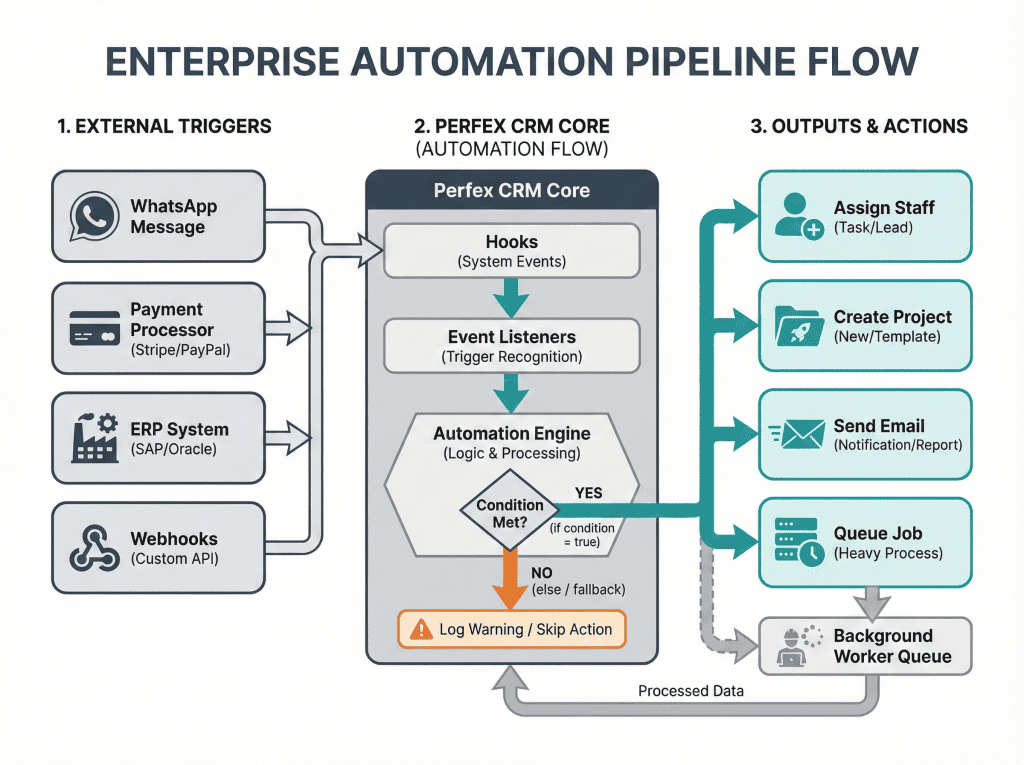
To build enterprise-grade workflows, it’s essential to understand the building blocks inside Perfex CRM enterprise automation. Perfex uses CodeIgniter 3, so its backbone features are:
1.1 Hooks
Hooks execute custom logic immediately when a specific event occurs in Perfex CRM, giving developers full control to extend or modify system behavior without altering the core files.
1.2 CRON Jobs
CRON jobs enable time-based automation by running predefined tasks at regular intervals. They are essential for scheduling background processes, such as reminders, data updates, or batch operations.
1.3 Webhooks
Webhooks allow Perfex CRM to receive real-time triggers from external systems, such as WhatsApp, Slack, or custom applications. They enable instant responses and seamless integration between platforms.
1.4 Custom Controllers & CLI Scripts
Custom controllers and CLI scripts allow running specific automation logic on demand, providing precise control over the timing and execution of tasks. They are particularly useful for operations that do not require continuous or scheduled execution.
1.5 Database Event Handlers
Database event handlers monitor changes in specific tables and automatically trigger business logic in response. They allow real-time automation based on data modifications without manual intervention.
1.6 Options & Settings
Options and settings provide a way to store automation rules and configure triggers within Perfex CRM. In enterprise environments, these configurations are combined to create complex, reliable automation pipelines. Let’s build them one by one.
2. Building Webhook-Based Automations in Perfex CRM
Modern enterprise systems rely heavily on webhooks — automated messages sent between systems.
Perfex supports custom endpoints easily using modules.
2.1 Create a Webhook Receiver Endpoint
Inside module:
modules/automation_module/controllers/Webhook.php

<?php
defined('BASEPATH') or exit('No direct script access allowed');

class Webhook extends CI_Controller {

    public function index() {
        $payload = json_decode(file_get_contents('php://input'), true);

        // Log payload for debugging
        log_activity('Webhook received: ' . json_encode($payload));

        // Trigger automation
        $this->process_webhook($payload);
    }

    private function process_webhook($payload) {
        if ($payload['event'] === 'contact.created') {
            // Example action: assign staff automatically
            $this->assign_staff_to_new_contact($payload);
        }
    }

    private function assign_staff_to_new_contact($payload) {
        $assigned = 5; // staff_id = 5
        $contact_id = $payload['contact_id'];

        update_contact($contact_id, ['assigned_to' => $assigned]);

        log_activity("Automation: Contact $contact_id assigned to staff $assigned");
    }
}
2.2 Using This Webhook in Automation Pipelines
Within automation pipelines, a webhook endpoint can receive triggers from multiple external systems, such as WhatsApp Cloud API, Zapier or Make.com, company ERP platforms, HR systems, payment processors, and custom mobile applications, enabling seamless integration and real-time workflow execution.
Use cases:
Common use cases for webhook-driven automation include automatically creating a lead when a WhatsApp message is received, auto-assigning staff after a contact form submission, syncing invoices with accounting software, and triggering workflows immediately after a contract is signed.
This approach replaces entire paid automation suites.
3. CRON Triggers — The Backbone of Heavy Automation
Time-based tasks allow businesses to execute operations in the background without user interaction.
Perfex runs its CRON every 5 minutes by default.
3.1 Create a Custom Cron Job
Inside module’s main file:
hooks()->add_action('after_cron_run', 'automation_cron');Then write the function:
function automation_cron() {
    $CI = &get_instance();
    $CI->load->model('automation_model');

    $CI->automation_model->process_scheduled_tasks();
}
3.2 Create the Cron Execution Logic
modules/automation_module/models/Automation_model.php

public function process_scheduled_tasks() {

    // Example: Auto-close stale tickets
    $tickets = $this->db->where('status !=', 5)
                        ->where('last_reply <', date('Y-m-d H:i:s', strtotime('-7 days')))
                        ->get('tickets')
                        ->result();

    foreach ($tickets as $ticket) {
        $this->db->where('ticketid', $ticket->ticketid)
                 ->update('tickets', ['status' => 5]);

        log_activity("Automation: Ticket {$ticket->ticketid} auto-closed by CRON");
    }
}
3.3 Enterprise Use Cases
Enterprise automation use cases include auto-closing inactive tickets, sending reminders automatically, performing daily data cleanup, assigning leads in a round-robin manner, managing invoice follow-up sequences, handling contract renewal workflows, sending SLA violation notifications, and performing batch synchronization with external applications. Implementing such automation is essential for maintaining efficiency and consistency in enterprise workflows.
4. Event-Based Logic — Build Real Workflow Reactors
Perfex CRM provides built-in hooks for nearly every major system event, such as lead creation, lead conversion, invoice generation, ticket opening, task completion, email sending, contact creation, and client registration. By leveraging these hooks, businesses can develop robust event-driven automations that respond instantly to changes within the system.
4.1 Example: When a Lead Converts, Create a Welcome Project
hooks()->add_action('after_lead_converted', 'create_project_after_conversion');

function create_project_after_conversion($lead_id) {

    $CI = &get_instance();
    $CI->load->model('projects_model');

    $project_data = [
        'name' => 'New Client Onboarding',
        'clientid' => get_customer_id_from_lead($lead_id),
        'status' => 1,
        'start_date' => date('Y-m-d'),
    ];

    $CI->projects_model->add($project_data);

    log_activity("Automation: Project created for converted lead $lead_id");
}
4.2 How Enterprise Teams Use This
Enterprise teams use event-driven workflows as the backbone for automating critical processes, including customer lifecycle management, lead nurturing, support pipelines, accounting operations, contract management, and employee onboarding sequences. With these capabilities, Perfex CRM functions as a full-fledged workflow engine, rather than just a traditional CRM.
5. Building a Custom PHP Automation Engine
To handle enterprise automation, businesses should build a central Automation Engine.
5.1 Automation Rule Structure
Create table:
automation_rules
------------------------
id
name
trigger_type (event | cron | webhook)
trigger_value
conditions (JSON)
actions (JSON)
status
created_at
5.2 Automation Engine Controller
modules/automation_module/controllers/Engine.php

public function run() {
    $rules = $this->automation_model->get_active_rules();

    foreach ($rules as $rule) {
        if ($this->conditions_match($rule)) {
            $this->execute_actions($rule);
        }
    }
}
5.3 Add conditional logic
private function conditions_match($rule) {
    $conditions = json_decode($rule->conditions, true);

    foreach ($conditions as $cond) {
        if (!$this->evaluate_condition($cond)) {
            return false;
        }
    }
    return true;
}
5.4 Action Executor
private function execute_actions($rule) {
    $actions = json_decode($rule->actions, true);

    foreach ($actions as $action) {

        if ($action['type'] === 'send_email') {
            send_mail_template($action['template'], $action['email']);
        }

        if ($action['type'] === 'assign_staff') {
            assign_staff_to_customer($action['client_id'], $action['staff_id']);
        }

        if ($action['type'] === 'create_task') {
            create_task_for_client($action['client_id'], $action['description']);
        }
    }
}
At this point, businesses have effectively created a Zapier-like workflow engine within Perfex CRM, complete with triggers, conditions, actions, and reusable logic that can automate complex business processes.
6. Background Jobs — Queueing Heavy Automation Tasks
Enterprise systems demand background workers to manage resource-intensive tasks without blocking user interactions, such as bulk email sequences, large data sync operations, financial calculations, template generation, scheduled reports, API batching, and lead syncing. Perfex CRM lacks a native queue system by default but leverages its built-in email queue, which stores emails in the database for cron-driven background processing to prevent slowdowns during high-volume sends. Developers can extend this pattern using custom cron jobs for heavy tasks—configured via cPanel or server crons calling /cron/index combined with database tables acting as queues, hooks for job insertion, and module libraries for processing logic like chunked data batches or retry mechanisms.
A custom queue builds on Perfex’s CodeIgniter foundation by creating tbl_job_queue tables with columns for job_type, payload (JSON), status, retries, and scheduled_at, then registering module cron tasks to poll and execute jobs in batches. This approach ensures scalability for enterprise automations, with monitoring via log_activity() for job tracking and error handling to auto-requeue failures, mimicking production systems like Laravel queues without paid modules.
6.1 Create Job Queue Table
automation_jobs
----------------
id
payload (JSON)
job_type
status (pending, running, done, failed)
created_at
updated_at
6.2 Add to Queue
public function queue_job($type, $payload) {
    $this->db->insert('automation_jobs', [
        'job_type' => $type,
        'payload' => json_encode($payload),
        'status' => 'pending'
    ]);
}
6.3 Cron Worker to Process Jobs
public function process_jobs() {

    $job = $this->db->where('status', 'pending')
                    ->order_by('id', 'ASC')
                    ->limit(1)
                    ->get('automation_jobs')
                    ->row();

    if (!$job) return;

    $this->db->where('id', $job->id)->update('automation_jobs', ['status' => 'running']);

    try {
        $this->execute_job($job);
        $this->db->where('id', $job->id)->update('automation_jobs', ['status' => 'done']);
    }
    catch(Exception $e) {
        $this->db->where('id', $job->id)->update('automation_jobs', [
            'status' => 'failed',
            'error_message' => $e->getMessage()
        ]);
    }
}
6.4 Execute Job Types
private function execute_job($job) {

    $data = json_decode($job->payload, true);

    switch ($job->job_type) {

        case 'send_bulk_email':
            foreach ($data['emails'] as $email) {
                send_mail_template($data['template'], $email);
            }
        break;

        case 'sync_leads':
            $this->sync_with_external_api($data);
        break;

        case 'generate_invoice_report':
            $this->create_report($data['client_id'], $data['period']);
        break;
    }
}
Now CRM can handle thousands of operations in the background without freezing the UI.
7. End-to-End Enterprise Automation Examples
Below are full enterprise automation use cases can implement:
7.1 Automated Lead Nurturing Flow
When a lead is created in Perfex CRM, this serves as the primary trigger for the workflow. The condition checks if the lead status equals “New,” ensuring the automation only activates for fresh prospects. Upon meeting this condition, the actions execute sequentially: a welcome email is sent to engage the lead immediately, a follow-up task is created for ongoing nurturing, the lead is assigned to the appropriate sales agent for personalized handling, the lead is added to an email sequence for automated drip campaigns, and a WhatsApp outreach message is queued for quick mobile communication.
7.2 SLA Management System
Perfex CRM’s SLA Management System relies on a CRON job configured to trigger every 5 minutes for real-time monitoring. This process systematically checks all open tickets to identify those approaching or exceeding their service level agreement deadlines. Deadlines are then calculated based on predefined SLA rules, such as response times or resolution targets tied to ticket priority and type. Tickets breaching SLAs auto-escalate to supervisors for immediate intervention, while managers receive automated notifications to ensure oversight. Finally, stale tickets inactive beyond configurable thresholds are auto-closed to maintain system hygiene and accurate reporting.
7.3 Accounting Automation
Perfex CRM implements a daily CRON job that executes at midnight to handle essential financial automations. This process begins by syncing all invoices with the QuickBooks API to ensure real-time data consistency across platforms. It then auto-sends personalized invoice reminders to overdue clients based on configurable payment terms, generates a comprehensive list of overdue invoices for review, and emails the finance team with the updated report for proactive collections management.
7.4 HR Onboarding Automation
Perfex CRM’s HR Onboarding Automation activates whenever new staff is added to the system as the primary trigger. This workflow creates a series of predefined onboarding tasks to streamline the process, assigns relevant training modules to the new hire for immediate skill-building, and sends a personalized welcome email to foster engagement from day one. It also notifies the HR team for oversight and compliance, while automatically creating calendar events for key milestones like orientation sessions and check-ins.
8. Performance Optimization for Automations
Building Perfex CRM enterprise automation workflows requires careful attention to performance. Large tables should be processed using LIMIT and batching to avoid excessive loops. Heavy tasks must always be moved to a job queue rather than running directly inside hooks. Frequently used queries should be cached, leveraging Perfex’s CodeIgniter caching support. Database indexes should be added to all tables involved in automation to optimize query performance. Additionally, logs should be kept clean by recording only essential events, ensuring efficient monitoring and minimal overhead.
9. Debugging & Monitoring Enterprise Automations
Perfex CRM enterprise automations require comprehensive debugging and monitoring to ensure reliability at scale. Essential monitoring covers cron logs for scheduled task execution, job queue performance to track processing delays, webhook failures with retry status, event listeners for hook responsiveness, and API errors including rate limits or authentication issues. Developers leverage Perfex’s native log_activity() function for structured activity tracking, custom log files in the application/logs directory for detailed diagnostics, error email alerts configured via hooks, and database error tracking through dedicated tables like tblactivitylog or custom schemas.
A custom monitoring dashboard can be built using Perfex modules, displaying real-time metrics such as cron success rates, queue backlogs, webhook delivery stats, and error trends via charts and filters. Tools like LogTracker modules enhance this with intuitive interfaces for log searching, real-time updates, and export capabilities, while integrating Telegram alerts or email notifications for critical failures.
10. Final Thoughts
At this stage, an enterprise-level automation engine exists inside Perfex CRM, incorporating webhooks, triggers, conditions, actions, background jobs, event listeners, scheduling, and custom rules. This setup is comparable to systems like HubSpot Workflows, Zoho Flow, Pipedrive Automations, Zendesk Triggers, and Salesforce Automations. The most impressive aspect is that it was built entirely without paid modules, using only native Perfex features and PHP. With proper structuring, this automation engine can reduce workload by up to 70%, improve SLA compliance, increase lead conversions, automate entire departments, and replace expensive automation tools.
References:
- Official module documentation of Perfex CRM — “Module Basics” describes how modules use the CodeIgniter framework, hooks, controllers, etc.
- Perfex CRM support documentation on action/filter hooks — shows how hooks are used to extend or customize core behavior without modifying core files.
- Best practices for building scalable PHP applications — advice on caching, database optimization, background jobs and overall performance that aligns with enterprise‑grade automation. 6B+1
- General Stack Overflow discussion on designing efficient background batch processes (via cron or scheduled scripts) — supports the pattern of moving heavy work out of request‑response flow into background jobs.